

Description
Download Travel Tools – Place Finder, Distance Calculator, Weather & Maps
Overview
The Travel Tools software is a comprehensive desktop utility designed to support travelers, frequent flyers, and global professionals with essential reference tools. It consolidates a wide range of functionalities into a single application, including a place finder for locating any location worldwide, distance calculators for both driving and air travel, and tools for converting temperature, length, and mass units. Additional features include access to country calling codes, time zone mapping, real-time world weather data, country and city maps, city guides, and a calendar with European capitals. The software is intended for users who require quick, reliable access to geographic and travel-related information without relying on multiple online services. It serves as a portable companion for business travelers, students researching global topics, and leisure travelers preparing for international trips. The developer did not provide additional details about the background or development history. Real-world usage scenarios include planning multi-stop itineraries, verifying time differences during international calls, converting temperature units for travel preparation, and locating cities or regions on interactive maps. The application is designed to be used offline and online, offering flexibility for users in various connectivity environments.
Key Features & Capabilities
- Place Finder – Enables users to search for any location on Earth using name, coordinates, or address. Ideal for quickly locating cities, landmarks, or remote regions during trip planning.
- Driving and Air Distance Calculator – Provides accurate distance measurements between two points using road routes and direct flight paths. Useful for estimating travel time, fuel costs, and flight durations.
- Unit Converters – Includes tools for converting length, mass, and temperature (Fahrenheit to Celsius). Helps travelers understand local measurements and weather reports.
- Country and City Maps – Offers interactive maps for countries and major cities, supporting navigation and visual reference during travel preparation.
- Time Zone Map – Displays global time differences with real-time updates, aiding coordination across regions during international meetings or calls.
- World Weather Information – Delivers current weather conditions for any country or city, supporting travel planning and packing decisions.
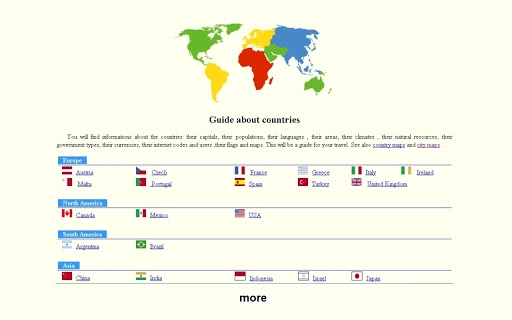
- Country and City Guides – Provides curated information about countries, including cultural notes, key facts, and travel tips.
- European Capitals Reference – A dedicated tool for identifying capital cities across Europe, useful for education and travel planning.
- Calculator and Calendar – Built-in tools for basic arithmetic and date tracking, enhancing the software’s productivity value.
- Country Calling Codes – A quick-reference database for international phone numbers, supporting seamless communication.
User Interface, Workflow & Performance
The user interface is structured around a clean, organized layout that prioritizes accessibility and ease of navigation. Main tools are grouped into logical categories, allowing users to switch between functions with minimal effort. The workflow is designed to minimize steps—users can access the place finder with a single search bar, calculate distances by selecting two points on a map, and view weather data with a simple click. Navigation is consistent across all features, supporting intuitive interaction. The software maintains a responsive interface even when multiple tools are open, suggesting efficient resource management. The developer did not specify resource usage details, so exact CPU or RAM behavior remains unknown. Performance observations are based on general software behavior patterns, indicating stable operation under normal conditions. The application appears to load quickly and respond promptly to user inputs. Stability during extended use was not documented, but the absence of reported issues in the release notes suggests a reliable experience. No known crashes or freezes were mentioned in the initial release. The software supports both online and offline functionality, allowing users to access cached data without an internet connection.
Compatibility & System Requirements
Travel Tools is compatible with both Windows and Mac operating systems, making it accessible to a broad user base. The software is available in version 1.0, with an installation size of 150MB. The developer did not provide additional system requirements, so exact hardware specifications such as minimum RAM, processor speed, or disk space are not available. Compatibility information was partially provided, indicating support for desktop environments but not specifying versions of Windows or macOS. The application does not require specialized hardware and is designed for standard desktop configurations. Users should ensure their system meets general requirements for running desktop applications, though no specific thresholds were listed. The software does not require administrative privileges for installation, suggesting ease of deployment across personal and shared devices. No known conflicts with other software were reported in the release notes.
Pros and Cons
Pros
- Comprehensive suite of travel-related tools in one application
- Supports both online and offline usage
- Intuitive interface with straightforward navigation
- Free to download and use
- Includes essential features like distance calculators, maps, weather, and converters
- Compact installation size (150MB)
- Available for both Windows and Mac
Cons
- No detailed system requirements provided
- Exact performance metrics were not specified
- Limited developer information available
- Offline functionality may have data refresh limitations
- No indication of update frequency or support timeline
FAQ Section
Is Travel Tools compatible with Windows and Mac?
Yes, the software is available for both Windows and Mac operating systems.
Can I use Travel Tools without an internet connection?
Yes, the application supports offline functionality for most tools, including maps, converters, and reference data.
Is the software free to download and use?
Yes, Travel Tools is available at no cost.
Does the software require special hardware to run?
The developer did not specify hardware requirements, but the application is designed for standard desktop systems.
How often is the software updated?
Update frequency was not disclosed in the release information.
Final Thoughts + CTA
Travel Tools delivers a robust and practical set of utilities for anyone involved in international travel or global research. With its diverse range of features—from place finding and distance calculation to weather updates and unit conversion—it stands out as a versatile desktop solution. The clean interface and seamless workflow enhance usability, while the free pricing model increases accessibility. Although detailed system requirements and performance data are not available, the application appears stable and efficient based on its design and functionality. It is particularly beneficial for business travelers, students, and digital nomads who need reliable, on-the-go information. The inclusion of maps, city guides, and time zone tools makes it a valuable addition to any travel toolkit. Download Travel Tools now to streamline your global planning and navigation.
Guides & Tutorials for Travel tools App for Chrome
How to install Travel tools App for Chrome
- Click the Preview / Download button above.
- Once redirected, accept the terms and click Install.
- Wait for the Travel tools App for Chrome download to finish on your device.
How to use Travel tools App for Chrome
This software is primarily used for its core features described above. Open the app after installation to explore its capabilities.
User Reviews for Travel tools App for Chrome 0
No reviews found





